
Can you control the system when the internet is down?
Yes. You can always control the heating from the My House Thermostat, which comes as standard with the system, to override the system as a whole. You can also use any radiator valve (Genius Radiator Valve or Wireless Radiator Valve) or Wireless Room Thermostat to control that individual zone.
From within the house, if you have a device running the Genius Hub iOS or Android app that is connected to your local Wi-Fi, you will always be able to control the heating with that.
It is not possible to do this using the web app on a computer. The web app is hosted on our website, so it needs an internet connection to work.
If you have disabled Manual Override
If you have disabled Manual Override in the app, the devices above cannot be controlled using their buttons. In this situation:
-
Power down the Genius Hub:
-
Older Hub-B (with a red circle on the top): disconnect the power cable.
-
Hub-C (small grey circle and separate grey 'G' logo) and HUB-D: disconnect the power cable, remove the Genius Hub from the backplate by sliding it up (away from the cables) and press the small white button.
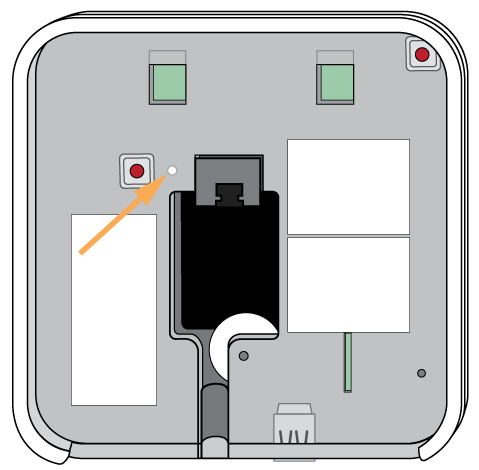
-
-
Control the boiler by manually controlling the boiler controller:
-
Control the radiator valves using their buttons. For more information, see manually overriding devices.
More information
All of the data and intelligence of the Genius Hub system is stored on the Genius Hub itself. We have chosen this over a cloud-based system because it makes your system more resilient to events such as losing your home internet connection. If this happens, the heating will continue to run as normal, and you can still access the system using the local Wi-Fi network.
The only features lost without an internet connection are remote support from Genius Hub, the weather forecast in the app, and the automatic pre-heat feature (which warms the room up early, based on the outside weather, so it is warm at the start of the heating period). The manual pre-heat feature will work as before.