
How uncontrolled radiators heat
If a radiator does not have a Genius Hub radiator valve (Genius Radiator Valve or Wireless Radiator Valve) on it, and is left with a manual valve or a TRV (Thermostatic Radiator Valve), it will come on whenever the boiler runs.
Genius Hub radiator valves allow you to set times of the day when you want a radiator to be on and off, but it is important to think about how they turn the radiators off as well as on. If you only control one radiator on a heating circuit with a Genius Hub radiator valve, then each time that radiator calls for heat the whole heating circuit will become hot. The controlled radiator will control to the temperature you set, but all of the uncontrolled radiators on the same heating circuit (where you have kept the existing valves) will also heat up, unless you have manually turned them off.
Heating only the uncontrolled radiators
If you want to bring the boiler on without any of the zones with Genius Hub radiator valves coming on, create a new zone in the app. We usually suggest calling it 'Rest of House'. You can use this zone to control the other rooms in your house that do not have Genius Hub radiator valves, and it will control to the temperature measured by the My House Thermostat.
If you schedule 'Rest of House' to come on by itself (and none of the other zones are calling for heat), the boiler will come on but all of the Genius Hub radiator valves will stay closed. This means the only radiators that warm up are the ones not controlled by Genius Hub radiator valves.
Step-by-step guide
-
Go to the My House page (click the My House icon at the top left of the app).
-
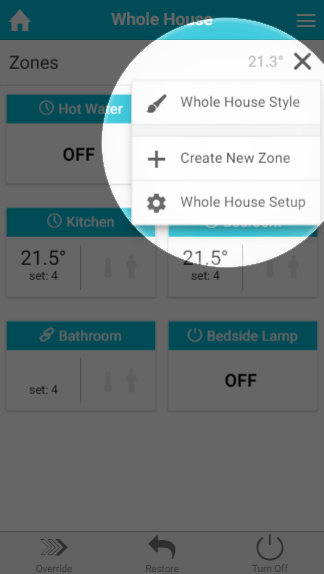
Click on the My House sub-menu (the ••• at the top right of the screen), then Create New Zone.
-
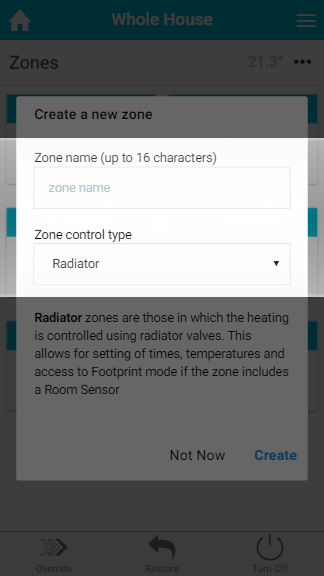
Type in the name 'Rest of House'. Leave the zone type as Radiator and then click Create.
-
Go back to the My House page by clicking the My House icon at the top left of the app. You will now have a new zone at the bottom of the list, where you can set up a schedule for the uncontrolled radiators.
The uncontrolled radiators will still heat whenever the Genius Hub radiator valves call for heat. The 'Rest of House' schedule is to bring them on when no controlled radiator is requesting heat.