
Accessing the system
There are two ways of accessing the Genius Hub system, depending on whether you are using an Android/Apple device or a computer.
On an Android/Apple device
On a mobile device (such as a smartphone, iPad or tablet), you can download the Genius Hub app from the Apple App Store or Google Play Store.
The app is available on Android versions 6 and above, and iOS 12 and above.
On a web browser
On a computer, or a device not running Android/Apple, you should access the system via our web app. This is found by going to our website and clicking on 'My Hub' at the top right of the screen, or by navigating to: www.geniushub.co.uk/app
Logging onto the system for the first time
To log onto the system for the first time:
-
Open the app on your phone or tablet, or go to the web app on a computer.
-
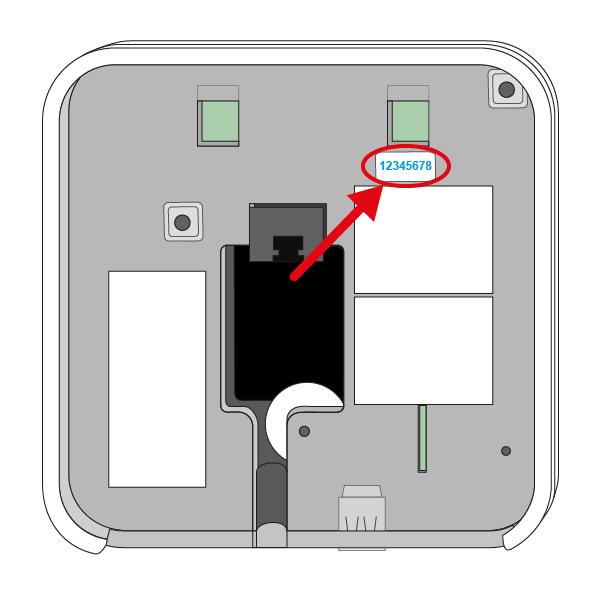
On the Welcome page, in the username field, enter the 8 blue characters found on the underside of the Genius Hub. These are behind the removable back plate that is used to attach the Genius Hub to the wall. Slide the back plate down to remove it from the back of the Genius Hub.
This is the temporary username, which can be changed to something more memorable once logged in.-
Enter only the numbers and letters (no spaces or symbols).
-
This field is not case-sensitive.
-
-
Leave the password field blank (a password is set when the system is registered).
-
Click 'Log In'.